GST Accounting Software India
GST Accounting Software Connected to Business Transactions
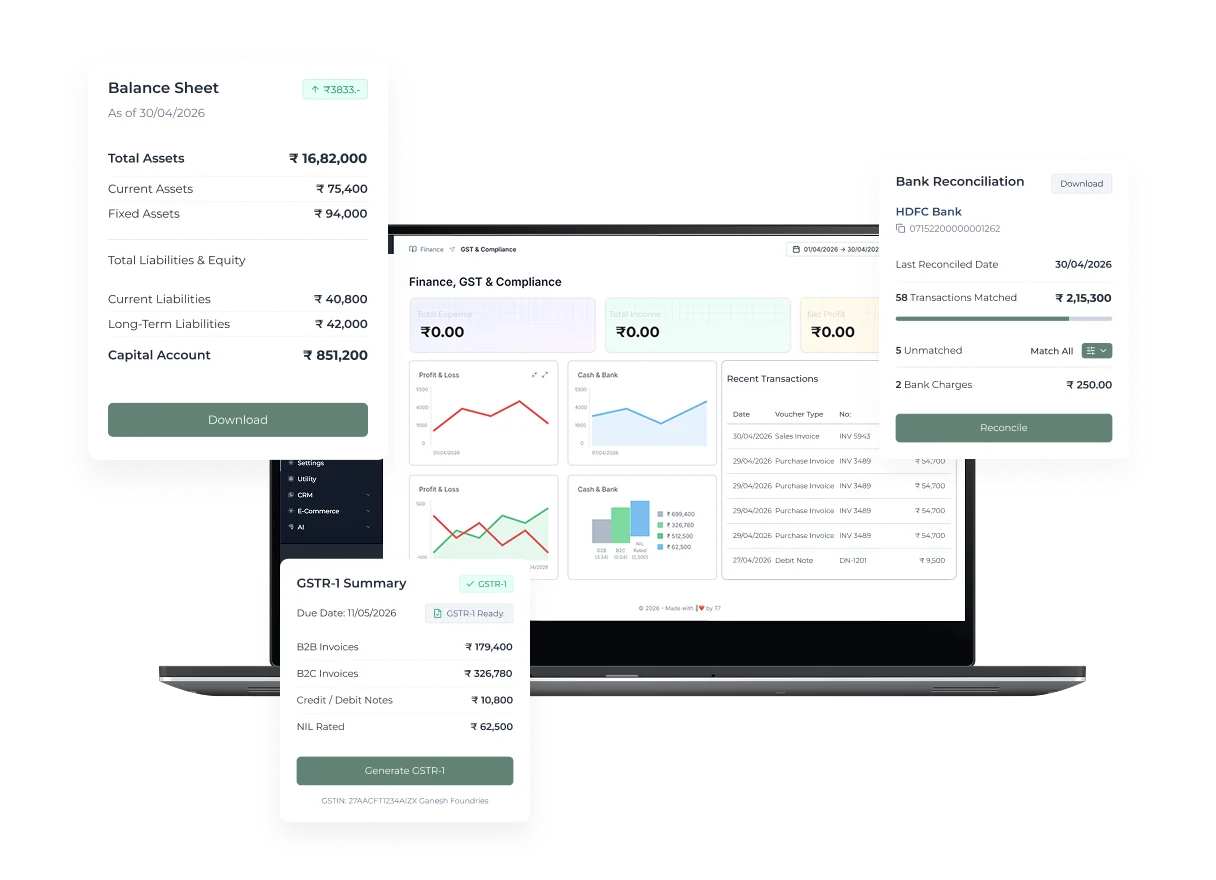
GST accounting software connects sales, purchases, returns, debit and credit notes, receipts, payments, tax classifications, ledgers, inventory, and period reporting. Unlike a billing-only page, this page focuses on the accounting record after and around the invoice: how transactions post, how balances reconcile, how corrections are controlled, and how data is prepared for professional review and applicable GST returns. T7 ERP can support this connected workflow when registrations, ledgers, product and party masters, tax rules, document series, permissions, and opening balances are configured correctly. Software assists recordkeeping and return preparation; the taxpayer and qualified advisers remain responsible for classification, eligibility, adjustments, filing, payment, and legal conclusions.
Product information updated 15 October 2026.
What is GST accounting software?
GST accounting software is a bookkeeping and operational system that records taxable business transactions with the ledger, party, document, classification, tax, and inventory details needed for accounts and return preparation. It should maintain links between source documents and postings, preserve correction history, separate registrations or branches where required, and support reconciliation between sales, purchases, tax summaries, receivables, payables, bank records, and portal data. This is different from merely printing a GST invoice. A complete accounting workflow includes purchase and expense entries, receipts and payments, journals, returns, credit and debit notes, opening balances, period controls, and exception review. Current return applicability and portal processes can change, so official GST guidance and professional advice should govern filing decisions.
GST billing versus GST accounting
Billing creates commercial documents; accounting connects those documents with books, balances, reconciliation, and period review.
| Area | Billing-focused workflow | GST accounting workflow |
|---|---|---|
| Primary record | Sales invoice or receipt | Sales, purchases, expenses, vouchers, notes, payments, and journals |
| Balances | Customer amount on a bill | Customer, supplier, cash, bank, tax, income, expense, asset, and liability ledgers |
| Corrections | Cancel or revise a bill | Controlled note, reversal, adjustment, posting, and audit trail |
| Return preparation | Invoice and tax summary | Reconciled period data reviewed against books and applicable portal records |
Operational Coverage
What This Workflow Needs to Cover
Ledgers and vouchers
Record source transactions in the appropriate accounting structure.
- ✓ Sales, purchase, receipt, payment, and journal context
- ✓ Customer, supplier, cash, bank, income, and expense ledgers
- ✓ Opening balances and period controls
GST-oriented transaction data
Maintain the configured fields needed for invoices, purchases, notes, and tax summaries.
- ✓ Registration, party, HSN or SAC, and tax data
- ✓ Intra-state and inter-state transaction context
- ✓ Credit, debit, return, and adjustment records
Inventory and account connection
Link product transactions with stock and accounting records where appropriate.
- ✓ Purchase and sales movements
- ✓ Returns and adjustments
- ✓ Valuation and cut-off rules to confirm
Reconciliation and review
Prepare period data for owner, accountant, and tax-adviser review before filing.
- ✓ Receivable, payable, bank, and cash review
- ✓ Tax and document summaries
- ✓ Exception, difference, and correction workflow
How to establish a controlled GST accounting workflow
Accurate reporting begins with transaction discipline and reconciliation, not a one-click filing promise.
- STEP 1
Configure the books
Set registrations, periods, ledgers, parties, items, classifications, taxes, document series, users, and opening balances.
- STEP 2
Record source transactions
Post sales, purchases, expenses, receipts, payments, returns, notes, and adjustments with supporting documents.
- STEP 3
Reconcile and correct
Review ledgers, stock, bank, parties, taxes, portal data, exceptions, and authorised corrections before close.
- STEP 4
Prepare and review returns
Generate applicable summaries or exports and obtain responsible taxpayer or professional approval before filing.
GST accounting software evaluation checklist
Test one complete period with normal transactions, corrections, and reconciliation—not only a sample invoice.
Posting logic
Confirm how invoices, purchases, expenses, payments, returns, notes, and journals affect ledgers, tax data, and inventory.
Corrections and audit trail
Test locks, permissions, reversals, amended documents, notes, deletion restrictions, logs, and period reopening.
Reconciliation
Demonstrate bank, party, stock, tax, document-series, e-Invoice, e-Way Bill, and portal-data differences relevant to your process.
Return responsibility
Clarify whether the scope is report, export, integration, preparation, or filing and who reviews applicability and final values.
When connected GST accounting may fit
Good fit when
- ✓ Businesses wanting billing, purchases, inventory, parties, payments, and books connected
- ✓ Teams needing controlled corrections and period reconciliation
- ✓ Owners working with accountants or tax advisers from the same transaction record
Confirm before choosing
- • Current GST registration, return, classification, ITC, and filing requirements
- • Multi-GSTIN, branch, cost-centre, audit, consolidation, or advanced accounting depth
- • Migration history, opening balances, bank feeds, integrations, and professional review process
Primary policy and regulatory sources
Regulations and portal behaviour change. Verify the current position with these official sources and your qualified adviser before implementation.
- CBIC accounts and records rules ↗
Official rules covering records, stock accounts, source documents, electronic records, edit logs, audit trail, and inter-linkages.
- GST Portal Form GSTR-1 guide ↗
Official portal guidance for outward-supply reporting, preparation modes, prerequisites, and e-Invoice data in GSTR-1.
Questions
Frequently Asked Questions
How is GST accounting different from GST billing?
GST billing creates sales documents. GST accounting also records purchases, expenses, vouchers, ledgers, payments, notes, corrections, reconciliations, balances, and period reporting.
Can accounting software file every GST return automatically?
Do not assume universal filing. Confirm the supported report, export, integration, preparation, authentication, and filing scope for each applicable return and registration.
Does software decide input tax credit eligibility?
Software can organise configured purchase and tax data, but eligibility, restrictions, reversals, evidence, reconciliation, and claims require current law and responsible professional review.
Why is an audit trail important?
It helps users trace a ledger entry back to the source document and understand who created, edited, reversed, or approved a transaction and when.
What should be reconciled before return preparation?
Review books, invoices, purchases, notes, parties, bank, stock, tax summaries, applicable portal data, document series, amendments, and unresolved exceptions.
Evaluate T7 ERP With Your Actual Workflow
Bring a sample invoice, product catalogue, branch structure, or process requirement to a scoped product walkthrough.
Request a Demo →