Invoice OCR Software
Invoice OCR Software With Review Before ERP Posting
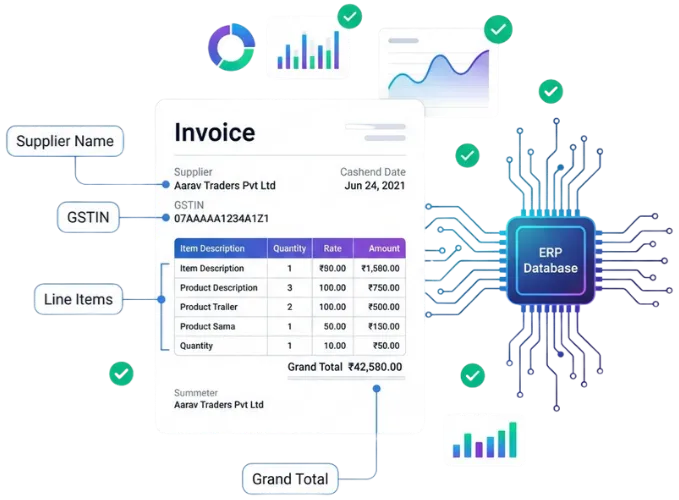
Invoice OCR software converts text and fields from supplier invoices or supporting documents into structured data for review. T7 ERP's invoice-processing workflow is intended to reduce repetitive purchase-entry work by staging extracted supplier, document, item, quantity, price, tax, batch, and total information in an inbox before an authorised user approves the ERP transaction. OCR output is not proof that an invoice is correct. Image quality, layout, language, handwriting, product descriptions, units, tax treatment, discounts, duplicate documents, and master-data matches can create errors. Every deployment should define supported file types, required fields, confidence and exception handling, duplicate checks, product mapping, approval permissions, source-document retention, and reconciliation before posting.
Product information updated 15 October 2026.
What is invoice OCR software?
Invoice OCR software uses optical character recognition and document-processing models to identify text and organise fields from invoice images or PDFs. The useful business workflow begins after extraction: the system must associate the document with the correct supplier, detect duplicates, map supplier descriptions to ERP products, validate quantities and units, separate taxable values and taxes, flag uncertain fields, and preserve the source document for review. A controlled OCR inbox lets users correct extracted information and approve or reject the proposed record before it affects purchases, inventory, tax data, or supplier balances. Accuracy varies by document and configuration, so buyers should test a representative sample that includes clean PDFs, scans, photographs, multiple layouts, poor images, credit notes, multi-page documents, and unusual tax or item lines.
Manual invoice entry versus reviewed OCR capture
OCR changes where effort occurs; it does not remove validation and accounting responsibility.
| Stage | Manual entry | Reviewed OCR workflow |
|---|---|---|
| Capture | User types fields from the document | System proposes fields from the uploaded document |
| Product mapping | User searches and selects every item | Configured mappings suggest ERP products for review |
| Validation | User checks while typing | Exceptions and extracted values are reviewed before approval |
| Posting | Entry is saved by the operator | Authorised approval creates the selected ERP record |
Operational Coverage
What This Workflow Needs to Cover
Document capture
Receive supported invoice files through the configured upload workflow.
- ✓ PDF or image intake where supported
- ✓ Source-document retention
- ✓ Document type and supplier identification
Field extraction
Propose structured values without presenting OCR as infallible.
- ✓ Supplier and invoice identifiers
- ✓ Items, quantities, units, values, and discounts
- ✓ Configured GST and batch-oriented fields
Mapping and exception review
Resolve uncertainty against controlled ERP masters before posting.
- ✓ Supplier-product mapping suggestions
- ✓ Unknown or ambiguous field handling
- ✓ Duplicate and total checks where configured
Approval and ERP entry
Keep a responsible user between extraction and financial or stock impact.
- ✓ Review, edit, approve, or reject
- ✓ Purchase or attachment workflow based on document type
- ✓ User and source-document trail
How a controlled invoice OCR workflow operates
The goal is faster reviewed entry, not unreviewed automation.
- STEP 1
Upload the document
Add a supported invoice image or PDF and retain the source for comparison and audit.
- STEP 2
Extract and classify
The system proposes document, supplier, item, quantity, price, tax, batch, and total fields where recognised.
- STEP 3
Review mappings and exceptions
A user resolves uncertain fields, duplicates, products, units, taxes, totals, and supporting-document issues.
- STEP 4
Approve and reconcile
Authorised approval creates the scoped ERP record, which is then checked against inventory, supplier, and accounting outputs.
Invoice OCR software evaluation checklist
Test a measured sample of your own difficult documents and record the correction required for every field type.
Document coverage
Confirm supported formats, pages, languages, image quality, layouts, credit notes, handwritten content, and maximum file constraints.
Field and mapping behaviour
Test supplier identification, products, packs, units, discounts, freight, batches, HSN, GST, rounding, and unmapped lines.
Human control
Review confidence indicators, mandatory fields, duplicate checks, edit permissions, approval levels, rejection, and reprocessing.
Evidence and retention
Confirm source-file access, user history, extraction changes, attachment linkage, retention, exports, and deletion responsibilities.
When T7 invoice OCR may fit
Good fit when
- ✓ Teams entering repeat supplier invoices into T7 ERP
- ✓ Businesses willing to review extracted data before posting
- ✓ Operations that can maintain supplier and product mappings
Confirm before choosing
- • Document formats, languages, handwriting, scan quality, and field coverage
- • Expected accuracy by document type and acceptable manual correction
- • Privacy, retention, access, approval, integration, and exception requirements
Questions
Frequently Asked Questions
Does invoice OCR eliminate manual review?
No. OCR proposes data; a responsible user should compare it with the source, resolve exceptions, and approve the record before it affects ERP transactions.
Can OCR read GST invoice fields?
The workflow can propose configured GST-oriented fields where recognised. Test GSTIN, HSN or SAC, taxable values, rates, tax components, notes, and unusual layouts with your documents.
Can supplier products map to ERP products?
Configured mappings can suggest ERP products for repeat supplier descriptions. New, changed, ambiguous, packed, or unit-converted items still require review.
How accurate is invoice OCR?
There is no responsible universal accuracy figure. Results depend on document type, image quality, layout, fields, language, configuration, and master data. Measure your own sample.
What happens before an invoice posts?
The document is staged, fields and mappings are reviewed, exceptions are corrected, and an authorised user approves or rejects the proposed ERP record.
Evaluate T7 ERP With Your Actual Workflow
Bring a sample invoice, product catalogue, branch structure, or process requirement to a scoped product walkthrough.
Request a Demo →