WhatsApp CRM for Retail
WhatsApp CRM for Permission-Based Retail Follow-Up
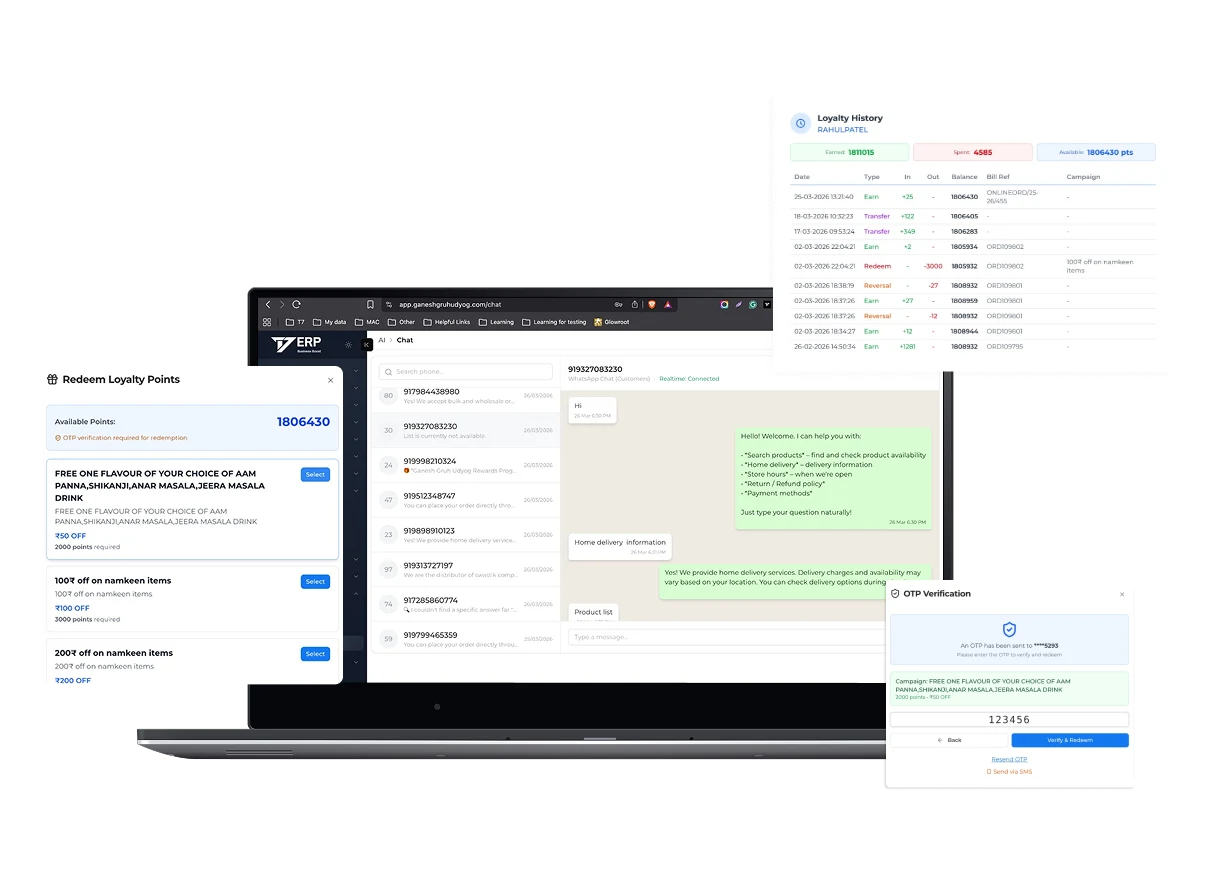
WhatsApp CRM for retail connects approved customer communication with customer records and relevant retail transactions. In a scoped T7 ERP workflow, retailers can evaluate digital bill delivery, service follow-up, customer segments, campaign lists, loyalty or membership context, conversation ownership, and response tracking through an approved WhatsApp provider. This is not permission to message every phone number collected at checkout. Businesses must establish a lawful basis, clear consent where required, approved templates and provider rules, accurate audience selection, opt-out handling, frequency controls, access permissions, and escalation ownership. Integration availability, message categories, template approval, pricing, limits, and policy requirements depend on the selected provider and current WhatsApp terms.
Product information updated 15 October 2026.
What is WhatsApp CRM for retail?
WhatsApp CRM for retail is a customer-management workflow that uses WhatsApp as an authorised communication channel while keeping customer identity, consent or communication preference, transaction context, segment, message purpose, owner, status, and response history organised. It differs from sending bulk messages from a personal phone or an unmanaged contact list. A controlled workflow should use an approved business setup, restrict access, apply current template and session rules, prevent communication to opted-out contacts, and let staff understand why a customer is being contacted. Useful retail applications can include requested bill delivery, order or service updates, targeted follow-up, feedback, and carefully governed loyalty communication. Results depend on relevance, permission, timing, list quality, offer, store execution, and customer preference; software cannot guarantee engagement or sales.
Ad hoc messaging versus CRM-connected WhatsApp
The key difference is governed customer context, permission, ownership, and traceability.
| Area | Ad hoc messaging | CRM-connected workflow |
|---|---|---|
| Audience | Phone list selected manually | Customers selected from defined records, preferences, and segments |
| Purpose | Message drafted without process context | Bill, service, follow-up, or campaign purpose recorded |
| Consent and opt-out | Handled inconsistently | Preference and suppression controls included in the workflow |
| Follow-up | Responses remain on one device | Ownership and permitted interaction context available to authorised staff |
Operational Coverage
What This Workflow Needs to Cover
Customer identity and preferences
Keep communication linked to the intended customer record and permitted purpose.
- ✓ Customer and contact records
- ✓ Consent or preference evidence where required
- ✓ Opt-out and suppression handling
Transactional communication
Support useful customer-requested or service-related messages in the configured scope.
- ✓ Digital bill delivery where enabled
- ✓ Order, service, or fulfilment updates
- ✓ Template and provider rules to confirm
Segmentation and campaigns
Create relevant audiences without treating the customer database as an unrestricted broadcast list.
- ✓ Purchase, branch, category, or membership context
- ✓ Audience review and exclusions
- ✓ Frequency and campaign approval controls
Ownership and measurement
Assign responsibility and review delivery, responses, opt-outs, and operational follow-up.
- ✓ User and branch ownership
- ✓ Message and response status where available
- ✓ Outcome definitions without guaranteed performance claims
How to implement a responsible WhatsApp CRM workflow
Start with a narrow customer need such as requested bill delivery or service follow-up.
- STEP 1
Define purpose and permission
Document message categories, lawful basis, consent evidence, customer preference, opt-out, frequency, and escalation.
- STEP 2
Configure provider and templates
Confirm approved business account, provider, templates, variables, charges, limits, delivery status, and fallback.
- STEP 3
Connect clean customer data
Deduplicate contacts, validate ownership and preferences, define segments, permissions, and transaction context.
- STEP 4
Pilot and review
Measure delivery, response, opt-out, complaints, staff workload, data quality, and operational completion before expansion.
WhatsApp CRM evaluation checklist
Ask the vendor to demonstrate consent, suppression, failed delivery, reply ownership, and provider-policy changes—not only message sending.
Provider and integration scope
Confirm the approved WhatsApp setup, service provider, template process, message categories, webhook or status flow, charges, and support boundaries.
Consent and preferences
Test how permission is captured, evidenced, changed, imported, expired if applicable, and enforced before audience activation.
Access and opt-out controls
Review staff permissions, exports, suppression lists, keywords, manual opt-out, complaints, and prevention of accidental re-addition.
Customer and transaction context
Demonstrate matching, duplicate contacts, shared numbers, branch ownership, bill linkage, segments, responses, and unresolved follow-up.
When T7 WhatsApp CRM may fit
Good fit when
- ✓ Retailers with clean customer records and defined communication purposes
- ✓ Teams connecting requested bills or follow-up with transaction context
- ✓ Businesses prepared to govern consent, templates, frequency, access, and opt-outs
Confirm before choosing
- • Current WhatsApp provider policies, template approval, message categories, charges, and limits
- • Applicable privacy, consent, marketing, recordkeeping, and customer-service obligations
- • Shared numbers, duplicate customers, franchise ownership, exports, integrations, and staff workload
Primary policy and regulatory sources
Regulations and portal behaviour change. Verify the current position with these official sources and your qualified adviser before implementation.
- WhatsApp Business Messaging Policy ↗
Official provider policy covering opt-in, opt-out, approved message templates, customer-service windows, data responsibilities, and policy updates.
- Digital Personal Data Protection Rules, 2025 ↗
Official MeitY source for the current Indian data-protection rules; confirm commencement and applicability with a qualified adviser.
Questions
Frequently Asked Questions
Is WhatsApp CRM the same as bulk messaging?
No. A responsible CRM workflow links communication to customer identity, purpose, permission, preference, opt-out, ownership, and transaction context rather than broadcasting an unmanaged list.
Can T7 ERP send a retail bill on WhatsApp?
A configured bill-delivery workflow may be available through the selected approved provider. Confirm customer preference, template, provider, charges, delivery status, and fallback.
Can retailers message every checkout customer?
Do not assume that collecting a number permits all messages. Define the purpose and apply current privacy, consent, provider, template, preference, and opt-out requirements.
Does WhatsApp CRM guarantee repeat sales?
No. Software can organise relevant communication and follow-up, but engagement and sales depend on permission, audience, message, offer, timing, store execution, and customer preference.
What should be measured in a pilot?
Track delivery, response, opt-out, complaints, failed or mismatched contacts, staff follow-up, operational completion, and data-quality issues using clearly defined measures.
Evaluate T7 ERP With Your Actual Workflow
Bring a sample invoice, product catalogue, branch structure, or process requirement to a scoped product walkthrough.
Request a Demo →