Point of Sale Software India
Point of Sale Software for Connected Retail Checkout
Point of sale software records the retail transaction at checkout and connects products, prices, taxes, discounts, payments, receipts, returns, customers, and stock movements. T7POS is designed for Indian retailers that need a counter workflow connected with T7 ERP records. Depending on the selected deployment and configuration, the evaluation can cover offline billing continuity, barcode or image-based item selection, printed or digital bills, customer-facing display, payment-device workflow, loyalty, and branch reporting. These capabilities should be demonstrated with the exact devices, connectivity conditions, invoice formats, payment providers, user permissions, and exception scenarios that each store will use; compatibility and integration scope should never be assumed from a feature label alone.
Product information updated 15 October 2026.
What is point of sale software?
Point of sale software is the system a cashier uses to identify items, apply configured prices and taxes, record discounts, accept payment, issue a receipt or invoice, and complete the sale or return. A connected POS also creates the appropriate inventory, customer, branch, and accounting records rather than leaving checkout data isolated. Retail requirements vary: a supermarket may prioritise barcode throughput and weighing workflows, a bakery may prefer image buttons and rapid quantities, and a multi-store chain may need offline continuity and central controls. Good POS selection therefore tests the complete counter journey, including login, opening shift, sale, mixed payment, hold and resume, return, exchange, cancellation, reprint, network interruption, end-of-day close, and reconciliation.
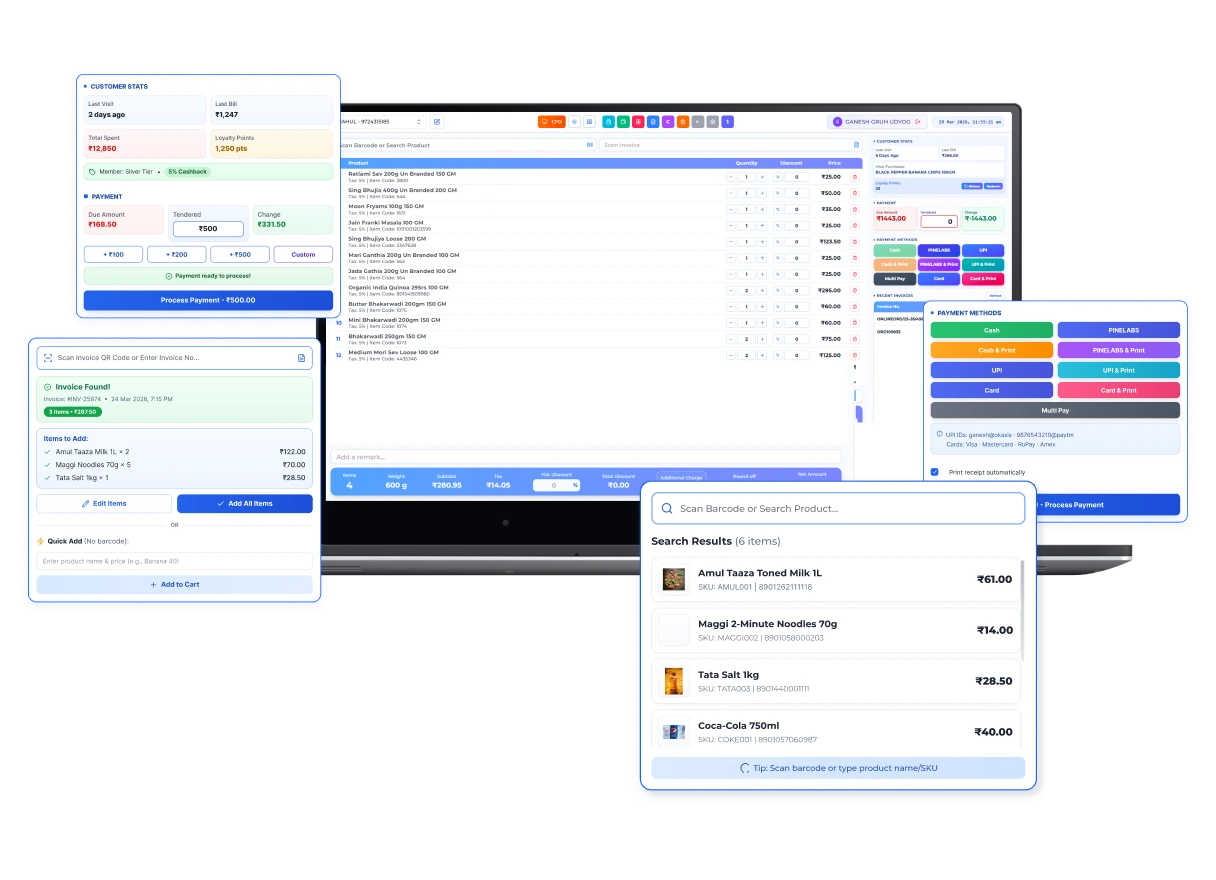
Standalone billing versus ERP-connected POS
A connected POS should preserve counter speed while creating usable downstream records.
| Retail task | Standalone counter tool | Connected POS workflow |
|---|---|---|
| Product selection | Manual search or basic catalogue | Configured barcode, search, or image-based selection |
| Payments | Recorded only on the receipt | Payment method retained with sale and reconciliation context |
| Inventory | Separate stock update or export | Posted sale or return creates the relevant stock movement |
| Branches | Separate files and reports | Branch transactions feed controlled central views after synchronization |
Operational Coverage
What This Workflow Needs to Cover
Fast item selection
Configure the interface around the store's catalogue and counter workflow.
- ✓ Barcode, product search, or image-based selection
- ✓ Quantity, unit, price, and discount controls
- ✓ Returns, exchanges, holds, and reprints
Offline continuity
Define which counter tasks continue during connectivity loss and how records reconcile later.
- ✓ Configured offline sale and receipt workflow
- ✓ Synchronization after connectivity returns
- ✓ Conflict, sequence, retry, and exception checks
Payment and customer experience
Keep payment, bill delivery, and customer interactions inside a controlled transaction.
- ✓ Cash and configured digital payment modes
- ✓ Printed or configured digital bill delivery
- ✓ Loyalty, membership, or customer display where selected
Stock and branch connection
Post completed counter transactions to the operational records used by managers.
- ✓ Sale and return stock movements
- ✓ Branch and cashier context
- ✓ Shift, payment, sales, and exception reporting
How to evaluate and roll out retail POS
A counter pilot with real hardware reveals more than a generic feature presentation.
- STEP 1
Map counter scenarios
List item selection, discounts, payments, returns, exchanges, connectivity loss, receipts, and close procedures.
- STEP 2
Prepare catalogue and devices
Clean products, prices, taxes, barcodes, users, printers, scanners, displays, and payment equipment.
- STEP 3
Run a controlled pilot
Test normal and peak checkout with real items, staff, hardware, bills, offline periods, and branch rules.
- STEP 4
Reconcile every output
Match transactions with cash, digital payments, stock, returns, tax records, shifts, and central reports.
Point of sale software evaluation checklist
Bring your busiest basket, slowest network scenario, exact peripherals, and difficult return case to the demo.
Offline definition
Ask exactly which actions work offline, what data is stored locally, how document numbering works, and how conflicts or failed syncs are handled.
Hardware and payment scope
Test the exact operating system, scanner, printer, customer display, weighing device, EDC provider, and connection method.
Controls and exceptions
Demonstrate manager approvals, price overrides, discounts, voids, refunds, exchanges, reprints, cash movements, and audit history.
ERP connection
Confirm when a sale posts to inventory, accounts, CRM, loyalty, and branch reports and what happens when posting fails.
When T7POS may fit
Good fit when
- ✓ Retailers that want checkout connected with inventory and business reporting
- ✓ Counters needing barcode or image-led product selection
- ✓ Multi-user or multi-branch stores prepared to test offline and synchronization workflows
Confirm before choosing
- • Exact hardware, EDC, WhatsApp, payment, and operating-system compatibility
- • Offline data, synchronization, numbering, and recovery requirements
- • Industry-specific weighing, serial, batch, prescription, kitchen, or order workflows
Questions
Frequently Asked Questions
Can T7POS continue billing without internet?
T7POS supports an offline-oriented billing workflow for selected deployments. Confirm the exact offline actions, local data, numbering, device setup, synchronization, and recovery behaviour during a scoped demonstration.
Does POS automatically reduce inventory?
In a connected configuration, the completed and posted sale or return creates the relevant stock movement. Scanning or adding an item before completion does not by itself post inventory.
Can T7POS send bills through WhatsApp?
A configured digital bill-delivery workflow may be available. Confirm the approved WhatsApp provider, templates, consent, message charges, fallback process, and selected plan.
Will existing scanners and printers work?
Compatibility depends on the device, operating system, driver, interface, paper or label format, and connection method. Test the exact hardware before rollout.
What should a POS pilot include?
Include normal and peak sales, mixed payments, discounts, returns, exchanges, holds, reprints, offline periods, shift close, cash reconciliation, and failed-sync recovery.
Evaluate T7 ERP With Your Actual Workflow
Bring a sample invoice, product catalogue, branch structure, or process requirement to a scoped product walkthrough.
Request a Demo →