Barcode Label Designer
Barcode Label Designer for Product and Shelf Tags
A barcode label designer defines what a printed product or shelf tag shows and where each field sits. For T7 Label Designer, evaluate how the layout gets the product name, item code, barcode and chosen price. Print a sample on your own printer and scan it at checkout before rolling it out.
Confirm the installer version, your Windows setup, printer model and driver with T7 before installing.
Product information updated 19 November 2026.
What is a product-linked barcode label?
A product-linked barcode label uses item data rather than requiring the operator to retype every product name, code and price. The layout controls where text and the barcode appear and how they fit the label, while the product record supplies the values. Those are two different places to fix a mistake: adjust the layout if a long name is clipped, and correct the source data if the label has the wrong variant or price. A barcode that scans is not sufficient proof: it must open the right product and size at the checkout. Also compare the displayed price with the approved price source for that store. A new layout or price record does not change a label already on a shelf, so schedule reprinting and removal of stale tags as part of the same process.
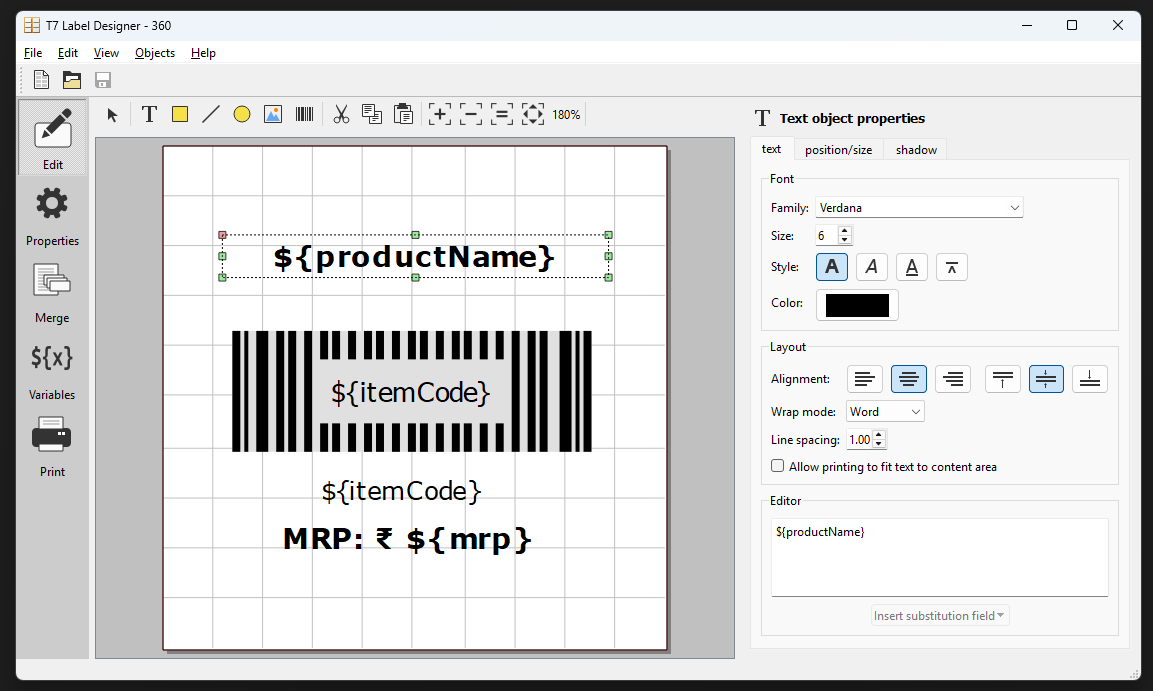
Do you need a barcode image, a printed label or billing software?
These are separate tasks; choose the one that matches the job at hand.
| Task | Starting point | What to check |
|---|---|---|
| Generate a barcode image | You already have the code value and need an image for a one-off use. | Check the code and test that the image scans after printing. |
| Design product labels | You need a reusable layout with fields drawn from product records for repeated print runs. | Verify the field mapping, print quality and paper or roll size. |
| Scan to bill | Your cashier needs the barcode to select the correct item at the counter. | Verify product lookup, quantity, pricing and what posts when a sale or return is completed. |
Operational Coverage
What This Workflow Needs to Cover
Fields to confirm on the layout
Decide what staff need to read and what the scanner needs to identify. For closely related packs, include a readable size or variant so staff can spot misapplied tags even before scanning.
- ✓ Use the intended product name, size, item code and barcode value
- ✓ Verify the source for the selected price field instead of assuming similarly named fields are interchangeable
Print setup to verify at the counter
Bring the actual model, driver, label stock and intended connection method to the demo. A preview can fit on screen even when a label prints off centre, clips the code or feeds at the wrong interval.
- ✓ Test media width, height, alignment and orientation with a physical print
- ✓ Check the result with the scanner and the label surface used in each lane
Worked demo: print, scan and reprint one shelf tag
Use these illustrative item codes and shelf prices to test the process; they are not T7 prices or a recommended label format.
- STEP 1
Map a specific size
Use DEMO-PCH-250 for a 250 g snack pouch with an approved shelf price of ₹120. Map the name, size, item code, barcode and approved shelf price. Keep the similar 500 g item in the test catalogue so a wrong mapping is easy to spot.
- STEP 2
Approve a proof label
Preview the layout and print one shelf tag on the intended media. Check that the size and price are legible. Scan at the intended checkout and verify the lookup opens the 250 g record rather than the 500 g product.
- STEP 3
Change the approved price
In the test records change the shelf price to ₹135 while keeping the same product code and barcode. Print another proof from the updated data and compare the printed price and lookup result with the approved record. A corrected label is not proof that checkout uses the same price.
- STEP 4
Replace the obsolete tags
Print replacement copies only for the locations that need them. Remove the old ₹120 shelf tags, record the number replaced, and rescan the new tag at the counter. If printed and checkout prices disagree, pause the rollout and check the source fields before reprinting again.
What should you verify in a Label Designer demo?
Bring your longest product name, two lookalike variants and a real sample of the tag material.
Exact printer, driver and media
Ask T7 to confirm the proposed configuration in writing. Demonstrate a single proof, several consecutive prints and recovery after changing a roll or print setting using the hardware you intend to keep.
Field ownership and reprints
Test who approves layout edits, where price data is maintained and how staff find the right layout later. Check which records your setup keeps for a bulk reprint or the replacement of a damaged tag.
When is a product label designer useful?
Good fit when
- ✓ Stores that print shelf and product tags repeatedly from an item catalogue
- ✓ Packing teams that need readable variant labels and a repeatable print-and-scan check
Confirm before choosing
- • For a single known code, a standalone barcode generator may be all you need
- • Confirm printer support, field sources and any required approvals before using a format in production
Questions
Frequently Asked Questions
Will T7 Label Designer work with my thermal printer?
Do not assume compatibility from a brand name. Ask T7 to verify the exact model, driver, connection, label media and Windows environment; then print and scan a proof in your own setup.
Does a price change require a new barcode?
In the worked example the existing code still identifies the same product, so only the printed price changes. Verify how your own codes are assigned and test which item and price appear at checkout before relabelling.
Can I make a barcode image without setting up a label layout?
If you already know the code and only need its image, use the standalone barcode generator. Use the Label Designer evaluation when you need a reusable design linked to product fields and your printing setup.
Evaluate T7 ERP With Your Actual Workflow
Bring a sample invoice, product catalogue, branch structure, or process requirement to a scoped product walkthrough.
Request a Demo →