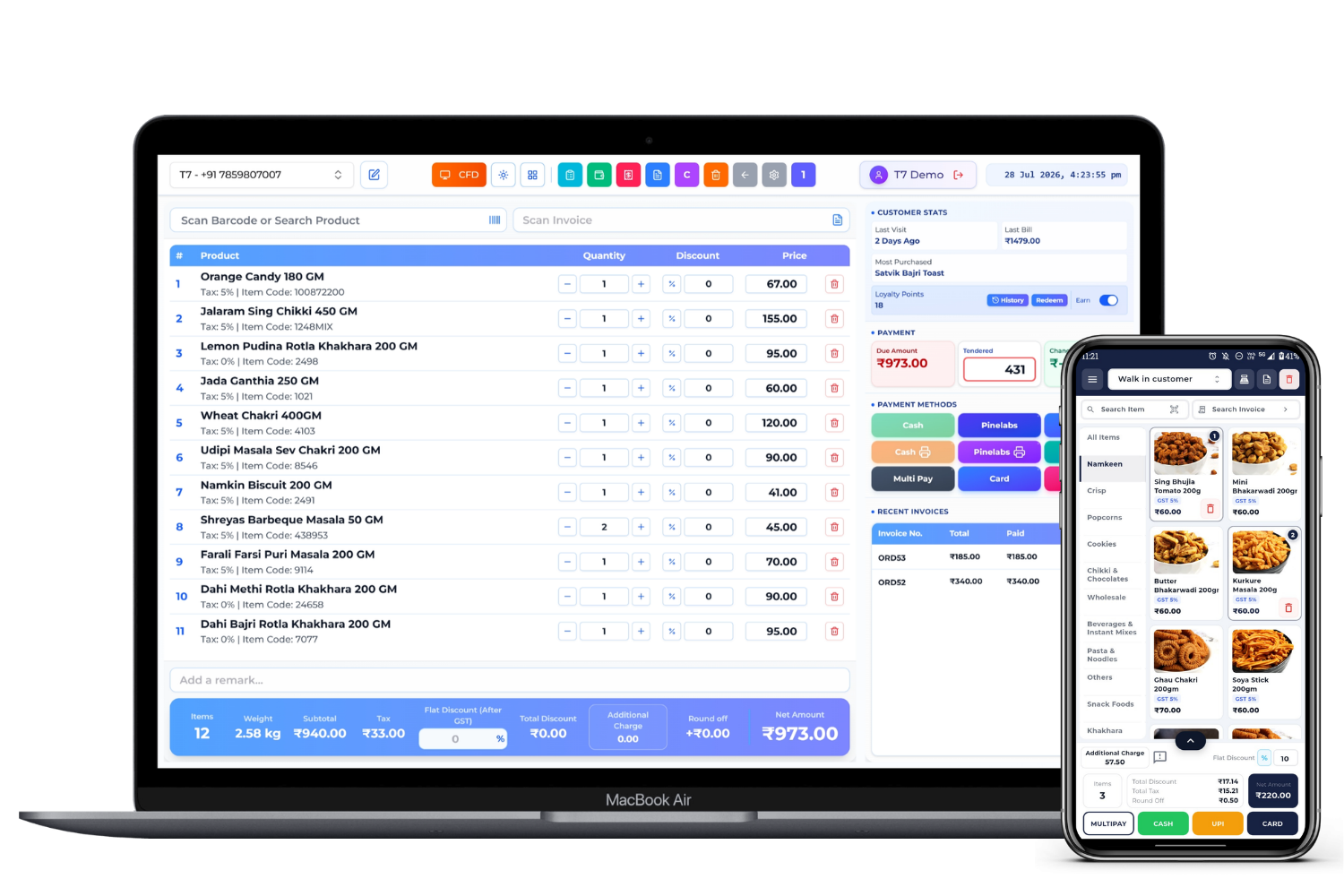
Barcode Billing Software India
Barcode Billing Software Connected to Product and Stock Records
Barcode billing software identifies a product from a scanned code and brings its configured description, unit, price, and tax data into the bill. In a connected T7 ERP workflow, completing the sale can also create the related inventory and customer records, while returns reverse or adjust the appropriate movements. Retailers can assign internal barcodes to products that do not arrive with usable codes and print labels using a configured format and compatible printer. Checkout speed depends on catalogue quality, barcode placement, scanner and printer compatibility, network and offline setup, counter design, and staff training—not on the barcode alone.
Product information updated 19 July 2026.
How does barcode billing software work?
A barcode stores an identifier; the billing system uses that identifier to retrieve a product record. The product master—not the printed bars—contains the item name, unit, selling price, tax configuration, stock attributes, and other operational data. During setup, existing manufacturer barcodes can be mapped to products, while internal codes can be generated for unlabelled items or store-specific packs. At checkout, the scanner sends the code to the billing interface, the user confirms quantity or other details, and the completed transaction updates the connected records. Reliable barcode billing therefore requires unique product mapping, readable labels, tested hardware, controlled price changes, and a process for duplicate, damaged, or missing codes.
Manual product search versus barcode billing
Scanning reduces selection effort, while product-master quality still controls accuracy.
| Task | Manual selection | Barcode workflow |
|---|---|---|
| Find product | Search or type name/code | Scan mapped identifier |
| Price and tax | User selects or enters data | System retrieves configured product data |
| Stock update | May require separate entry | Completed sale can create linked inventory movement |
| Control risk | Wrong item or manual entry | Duplicate mapping, unreadable labels, or incorrect master data |
Operational Coverage
What This Workflow Needs to Cover
Barcode mapping
Use supplier codes where suitable or assign controlled internal identifiers.
- ✓ One code mapped to the intended SKU or pack
- ✓ Duplicate-code checks
- ✓ Product, unit, price, and tax master linkage
Label generation and printing
Create readable labels that match the product, packaging, and printer setup.
- ✓ Configurable label content and dimensions
- ✓ Batch printing for selected items
- ✓ Printer, media, and ribbon testing
Scan-to-bill workflow
Retrieve products quickly while retaining user control for quantity and exceptions.
- ✓ Scan mapped product at checkout
- ✓ Handle repeated quantity, discounts, and returns
- ✓ Record payment and issue receipt or invoice
Inventory connection
Link the sale or return to stock records rather than updating a separate sheet.
- ✓ Sales and returns create relevant movements
- ✓ Branch or location context
- ✓ Movement history for review
How to implement barcode billing
A controlled pilot prevents duplicate codes and hardware surprises at go-live.
- STEP 1
Clean the catalogue
Agree on SKUs, packs, units, variants, tax data, prices, and existing barcode mappings.
- STEP 2
Choose and test hardware
Test scanners, printers, label media, connectivity, and counter placement with real products.
- STEP 3
Generate and verify labels
Print a pilot batch, scan each code, and confirm the retrieved product and selling data.
- STEP 4
Pilot checkout and returns
Run sale, quantity, discount, return, offline, and reprint scenarios before wider rollout.
Barcode billing evaluation checklist
Bring your scanner, printer, labels, and difficult products to the product demonstration.
Symbology and mapping
Confirm the barcode formats and product-to-code relationships used by your suppliers, packs, and internal labels.
Hardware compatibility
Test the exact scanner, operating system, printer, driver, label size, media, and connection method.
Price and unit changes
Demonstrate packs, multiple units, price lists, promotions, and how existing labels behave after master-data changes.
Exceptions
Test unreadable, missing, duplicated, returned, exchanged, weighed, or serial-controlled products relevant to your store.
Is barcode billing a good fit?
Good fit when
- ✓ Retailers with repeatable product catalogues and busy checkout counters
- ✓ Businesses that want completed bills linked to inventory
- ✓ Stores prepared to maintain clean item and barcode masters
Confirm before choosing
- • Weighed, loose, variable-price, serial, or batch-controlled product requirements
- • Exact scanner, printer, label, operating system, and driver compatibility
- • Who owns product mapping, label printing, and catalogue maintenance
Questions
Frequently Asked Questions
Can T7 ERP create barcodes for products without a manufacturer code?
T7 ERP supports assigning internal product identifiers and printing labels through a configured workflow. Confirm the required barcode format, label design, and printer during setup.
Does a barcode contain the product price?
Usually the barcode contains an identifier. The billing system retrieves the current product description, price, tax, and other data from the mapped product master.
Does scanning automatically update stock?
The scan selects the product; the completed and posted sale or return creates the relevant inventory movement in a connected setup.
Will any scanner and label printer work?
Do not assume universal compatibility. Test the exact scanner, printer, drivers, operating system, connection, label media, and required format before purchase or rollout.
What causes barcode billing errors?
Common causes include duplicate mappings, poor print quality, damaged labels, wrong units or packs, stale prices, incorrect product masters, scanner configuration, and untested exception workflows.
Evaluate T7 ERP With Your Actual Workflow
Bring a sample invoice, product catalogue, branch structure, or process requirement to a scoped product walkthrough.
Request a Demo →